Templates
E-commerce
The e-commerce template architecture covers how a production-ready online store is organized. Product catalog, cart, wishlist, checkout, and account flows. Built on Astro + React + Tailwind CSS.
Last updated: 2026-03-29
What's Included
A complete storefront with product catalog, filtering and search, cart drawer with persistent state, wishlist management, full account flows (login, register, order status, returns), and responsive layouts tested across all browsers. Everything is modular. Swap out sections, add pages, or connect your own backend.
Key Features
The template handles the core challenges of e-commerce so you can focus on your brand and products.
Architecture Overview
Pages, components, data, and utilities are cleanly separated. Astro handles routing and static generation. React powers interactive islands (cart, filters, search). Tailwind handles styling. JSON files drive product data and navigation. Easy to swap for a CMS or API later.
src/
├── pages/            # Routes (home, products, cart, account…)
├── components/       # Organized by feature (product, cart, filters…)
├── data/             # JSON-driven content & product catalog
├── store/            # Cart & wishlist state management
├── layouts/          # Page templates
└── styles/           # Global styles & theme
Anatomy
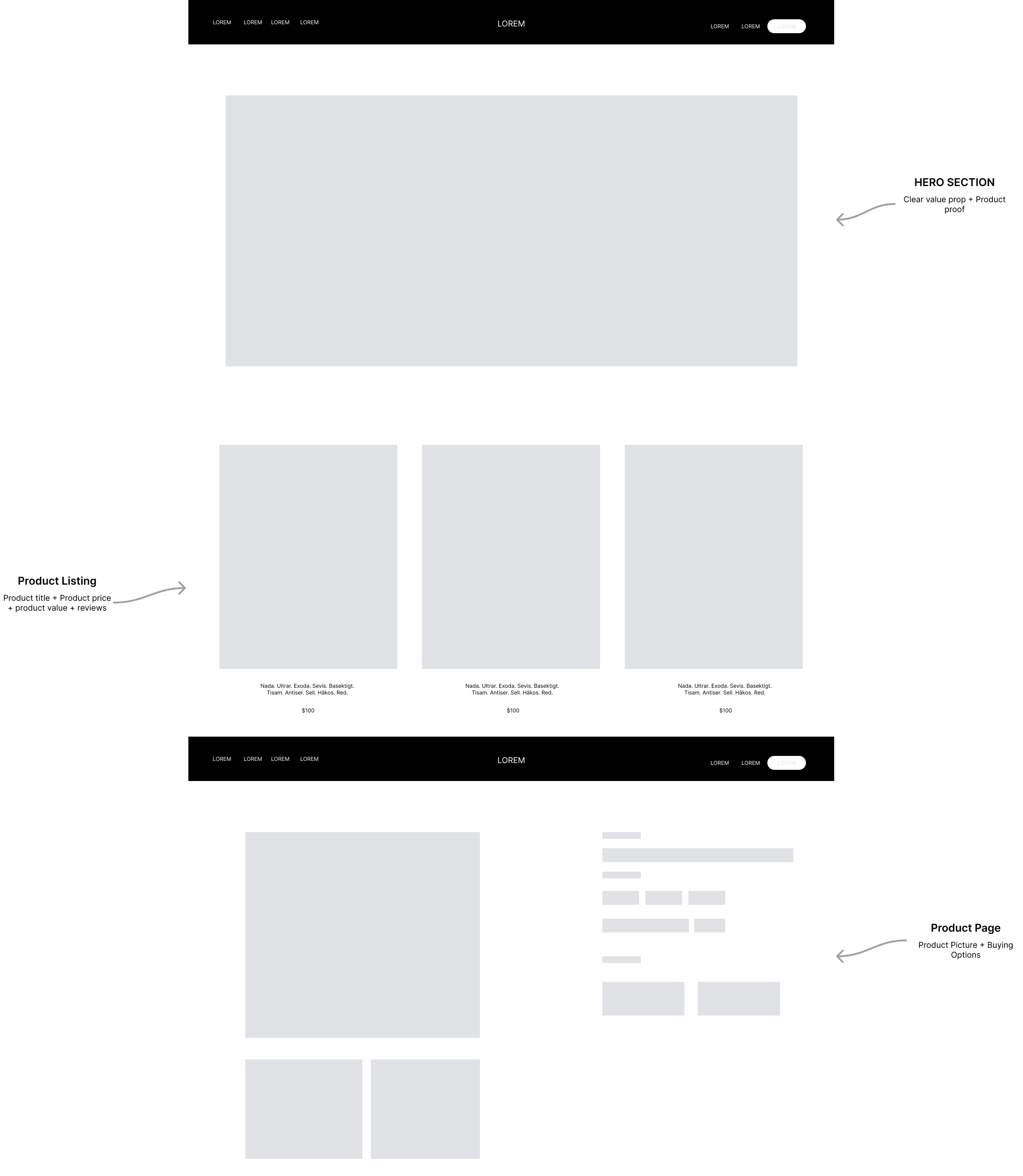
Every e-commerce template in Flux Theme is built around three core zones — a Hero that earns attention, a Product Listing that drives discovery, and a Product Page that closes the sale.
Content Management (No Code)
Connect a headless CMS so your team can add products, update prices, and publish content from a visual dashboard. No code required. JSON-driven architecture makes swapping data sources simple.
Recommended CMS Options
Choose the CMS that fits your team. Each one integrates with the e-commerce template and lets non-technical users manage the entire store.
// How it works:
// 1. Products & content live in your CMS (not in code)
// 2. Editors manage everything from the CMS dashboard
// 3. Astro fetches data at build time → static, fast pages
// 4. Webhooks auto-rebuild when content changes

// Example: Fetching products from any CMS
// src/lib/products.js
export async function getProducts() {
  // Swap this data source — same component, different CMS

  // Option A: Sanity
  // const products = await sanityClient.fetch('*[_type == "product"]');

  // Option B: Strapi
  // const products = await fetchAPI('products?populate=*');

  // Option C: Contentful
  // const products = await client.getEntries({ content_type: 'product' });

  // Option D: Shopify Storefront API
  // const products = await shopifyClient.product.fetchAll();

  return products;
}
Editor Workflow
Here's what it looks like day-to-day for a store owner or content editor who doesn't write code.
Payment Integration
The checkout flow is designed for Stripe integration. Card details never touch your server. Stripe.js handles tokenization on the client. Your backend only receives a PaymentIntent and webhook event, keeping you out of PCI scope. See the Stripe integration guide for setup details.
Tech Stack
Built with a modern, production-ready stack that scores 96+ Performance, 98 Accessibility, and 97 SEO on Lighthouse.